


A proposal to exempt employees earning up to KSh 32,333 a month from PAYE could change what your business deducts from salaries. The changes are still pending, but understanding them now gives your business time to assess the potential impact and plan any payroll adjustments.
We’ll explain what’s proposed and what applies now, then show you how to check your calculations with Bridge Talent Group’s (BTG) PAYE calculator.
What Are the Proposed PAYE Changes?
Under the proposed PAYE structure, the government would:
- Apply a zero tax rate to monthly income up to KSh 32,333.
- Remove the KSh 2,400 monthly personal relief currently available to eligible resident individuals.
- Retain the higher PAYE rates of 25%, 30%, 32.5%, and 35%.
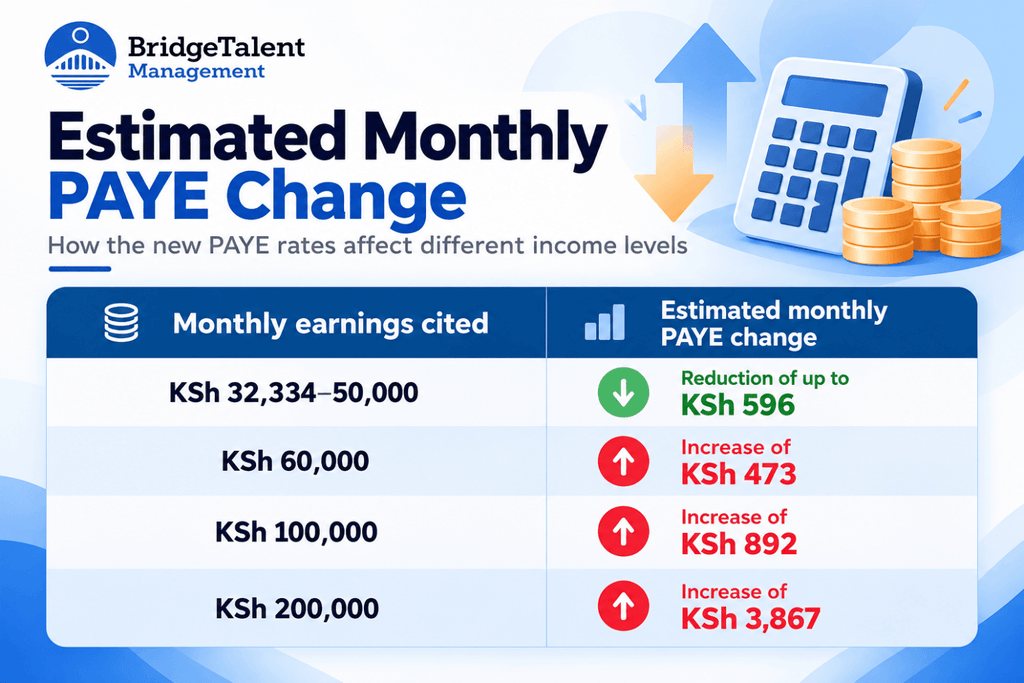
The intended benefit is higher take-home pay for lower-paid employees who currently pay PAYE. However, Treasury estimates suggest some higher earners could pay more:
What Should Employers Deduct Now?
Until changes take effect, continue using the existing PAYE bands:
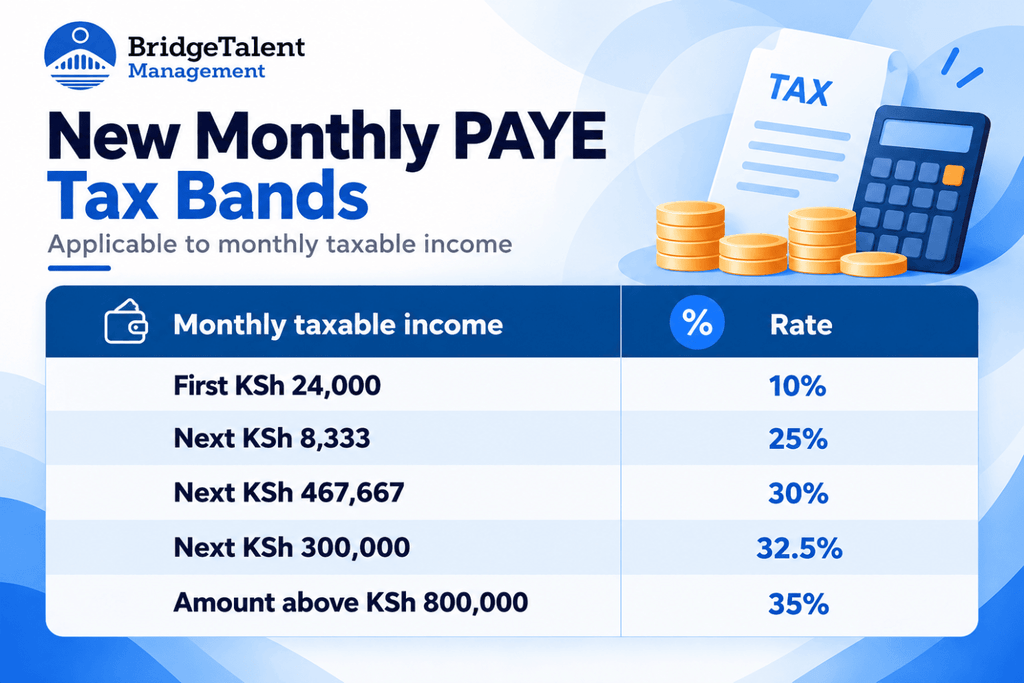
Eligible resident individuals still receive personal relief of KSh 2,400 per month. Continue handling NSSF, SHIF, and Housing Levy under their applicable requirements. A proposed PAYE exemption does not itself remove those obligations.
Check Your Current PAYE With BTG’s Calculator
Until the proposed changes become law, BTG’s PAYE calculator can help you check salaries and deductions using the rules currently in force. You can use it to:
Calculate Take-Home Pay From Gross Salary
Enter the gross salary to see the estimated amount left after deductions. You get a breakdown of PAYE and the other deductions included, so you can understand how the salary before deductions translates into money in the employee’s account.
Find the Gross Salary Needed for a Target Net Pay
Starting with a take-home amount? The net-to-gross mode estimates the gross salary needed to reach it. You can assess a net-pay request without repeatedly adjusting the gross figure and recalculating deductions.
Estimate Employer Payroll Cost
The calculator’s “Total cost to employer” shows gross pay plus employer NSSF, Housing Levy, and NITA contributions. Use it to check whether a proposed salary or pay increase fits your payroll budget.
Include Benefits, Deductions, and Reliefs
Enter benefits such as a company car, telephone, or meals where they are taxable. You can also add pension contributions, mortgage interest, and insurance premiums so the calculator accounts for the relevant deductions and reliefs.
Settings cover NSSF, SHIF, and Housing Levy, with an option for employees who hold a disability exemption certificate.
See How PAYE Is Worked Out
The breakdown shows taxable earnings, allowable deductions, tax charged, reliefs, and PAYE. Follow the calculation to identify which items affect the result.
Save or Share Your Results
Download the breakdown as a PDF for future reference, or share it with someone reviewing the figures.
Worked Examples Under the Current Rules
Here’s how the calculator finds the net or gross pay figure under the current rules. We’ll calculate net pay from a KSh 150,000 gross salary and gross pay from a KSh 100,000 take-home target.
Both examples assume the employee pays NSSF, SHIF, and Housing Levy, receives personal relief, and has no taxable benefits, additional deductions, or disability exemption.
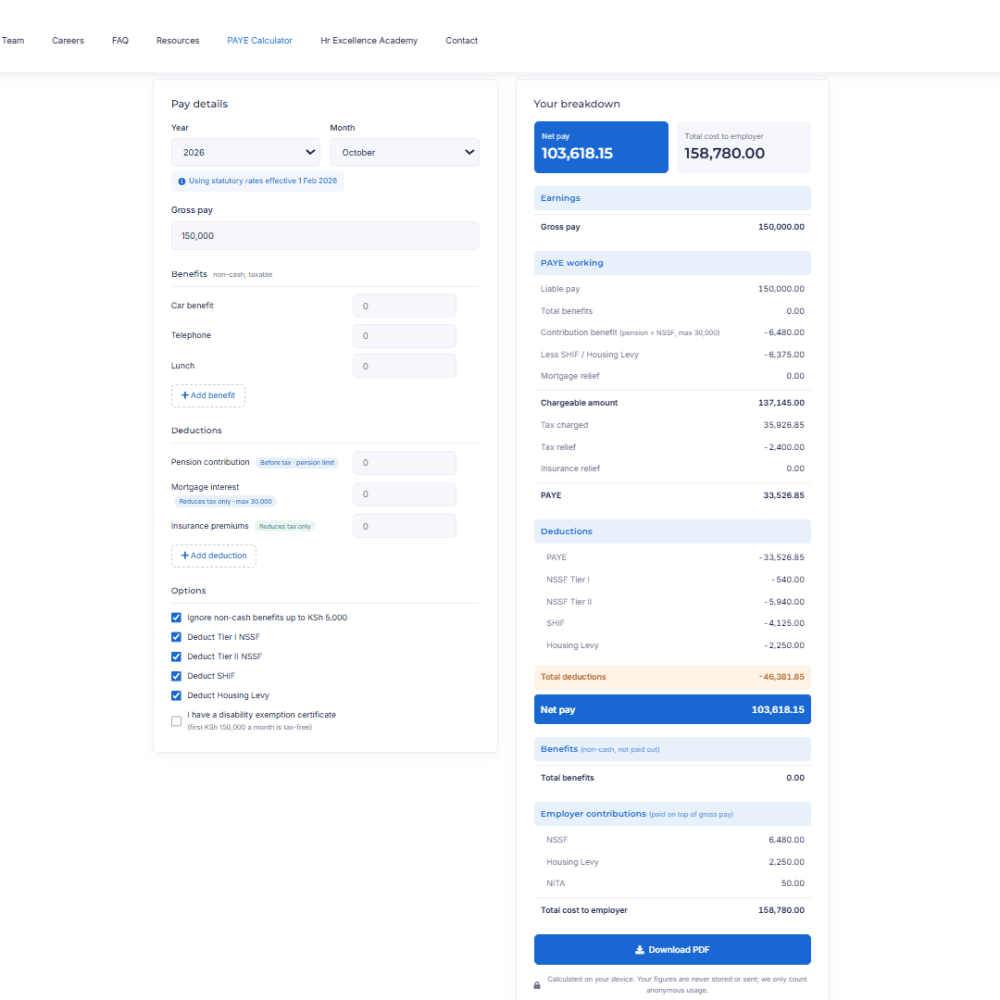
Gross to Net: KSh 150,000 Monthly Salary
In the calculator, select “Gross to net pay”, enter the salary, and get this breakdown:
The employer side looks different:
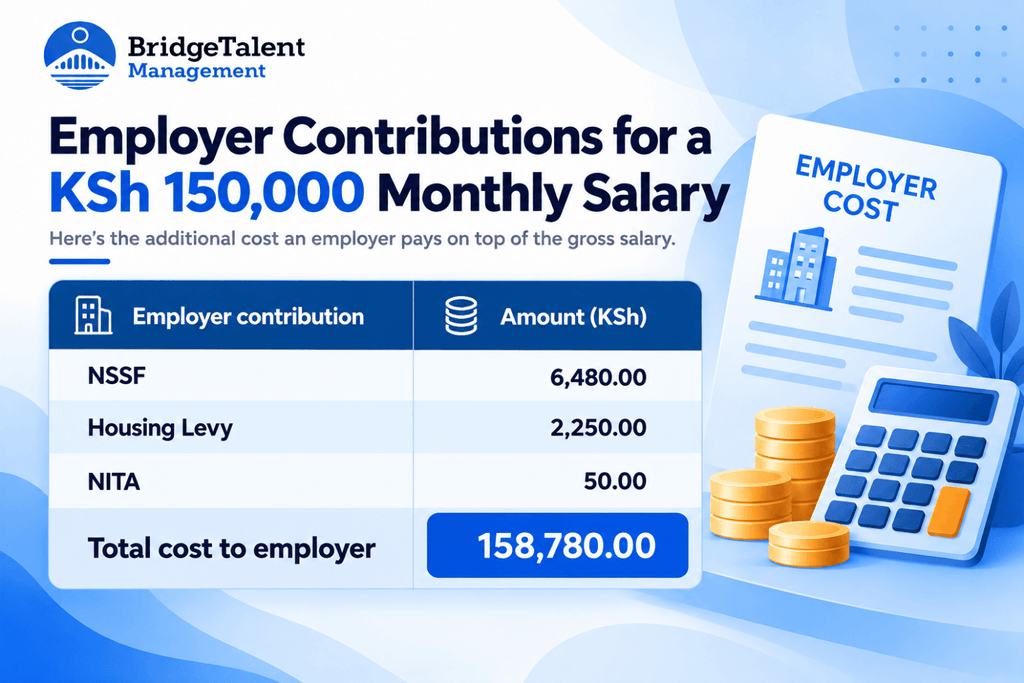
Two things stand out. The employee takes home KSh 103,618.15, about 69% of the quoted salary. And the business pays KSh 8,780 on top of the gross, so the monthly cost of this role is KSh 158,780.
Now compare these lines with your own payslip or payroll report. If PAYE and net pay match, you’re done. If they don’t, the next section shows where to look.
Net to Gross: KSh 100,000 Monthly Take-Home Pay
In the calculator, select “Net pay to gross”, enter KSh 100,000 under “Net pay you want”, and get this breakdown:
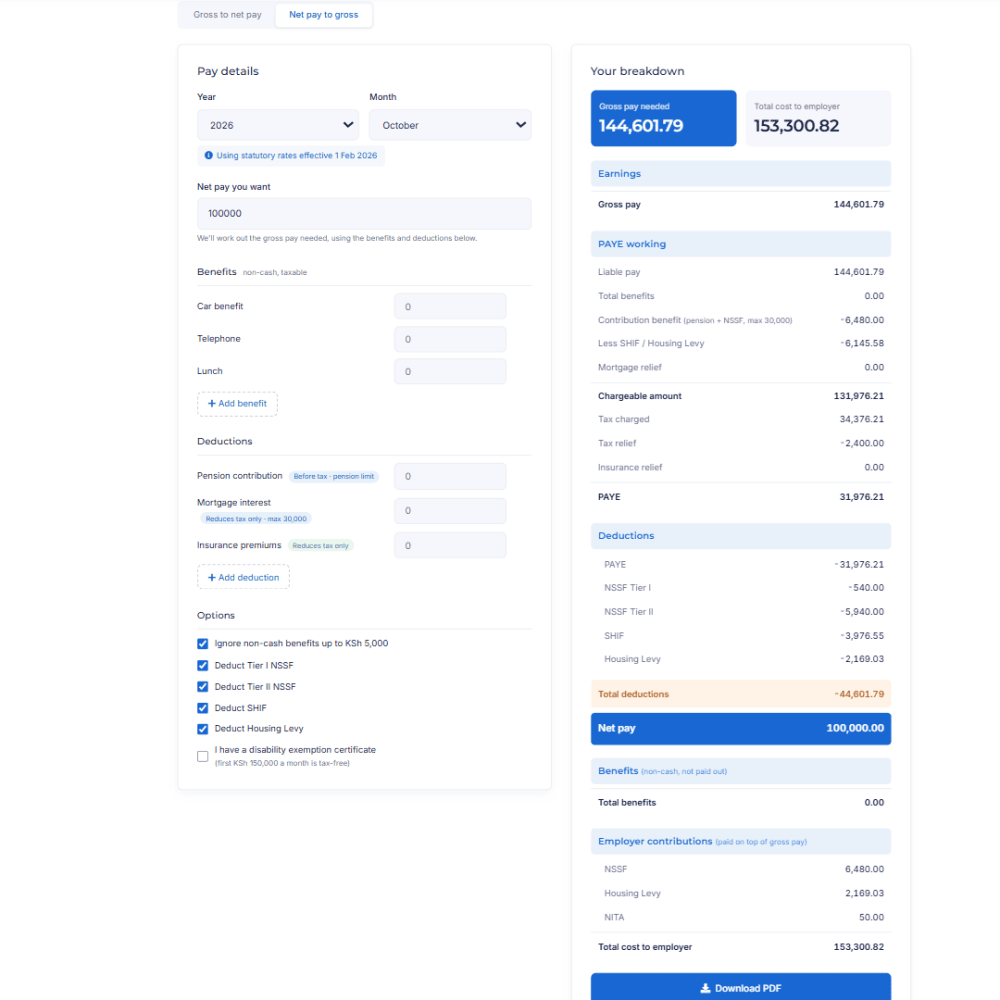
Employer contributions are added on top of the gross pay:

To deliver KSh 100,000 in take-home pay, the gross salary needs to be KSh 144,601.79 under these assumptions. Employer contributions add another KSh 8,699.03, bringing the estimated monthly payroll cost to KSh 153,300.82.
This is useful when discussing a salary based on what the employee wants to receive after deductions. You can see the gross salary required and check whether the resulting payroll cost fits your budget.
What to Do If the Figures Don’t Match
A difference is a reason to investigate, not proof that either figure is wrong. The calculator gives estimates based on the inputs and settings chosen. Start by confirming both calculations use the same gross pay, pay period, and statutory rates. Then compare:
- Taxable benefits and other earnings included.
- Pension contributions, mortgage interest, and insurance details.
- NSSF, SHIF, and Housing Levy settings, and exemption status.
- Reliefs applied.
- Any other deductions shown in your payroll but outside the calculator.
Look for the first line where the breakdowns diverge. If taxable income matches but PAYE doesn’t, check how tax and reliefs were applied. If PAYE matches but net pay doesn’t, compare the remaining deductions, including any loans or salary advances. If the figures differ earlier, check the inputs.
If you can’t explain the gap, share both breakdowns with your payroll provider or accountant before correcting anything.
Check Your Next PAYE Figure With BTG
While the proposed changes go through the legislative process, your next payroll still needs to follow the rules in force.
Try BTG’s PAYE calculator with a salary figure you want to check. Review the breakdown, compare the amounts, and follow up on unexplained differences. Results are estimates based on your inputs and settings; check the rates used for the relevant period.
For support with ongoing payroll processing, statutory filings, and compliance, contact Bridge Talent Group to discuss our payroll outsourcing services.